
Rummy Gems APK Download
Free 40 to 58 MB APK for Android 5.0 or higher with a ₹51 sign-up bonus. Download and install it now.
The Rummy Gems APK download is a free Android file for installing the real-money card game app directly onto your phone. It takes up 40 to 58 MB, depending on the build, and requires Android 5.0 or later. Here are the file specifics, installation steps, update process, and solutions for common installation issues.
Rummy Gems APK File Details
Rummy Gems is provided as a direct APK file for Android. The download is free, and the app is intended for players aged 18 and above. Build numbers change with each update, so the current version is shown on the app's own update screen.
| App name | Rummy Gems |
| File type | APK for Android |
| File size | 40 to 58 MB, by build |
| Recent build numbers | 3.0.0, 3.1, 4.1.7 |
| Android version | 5.0 or higher |
| Price | Free |
| Age | 18+ |
| Sign-up bonus | ₹51 |

Device Requirements
The app is lightweight and works on most Android phones sold in India in recent years. A stable internet connection is more important than processing power, as you play each table live against other players.
Leave extra free space beyond the APK size. The app downloads game assets after the first launch, and updates require room to unpack.
| Operating system | Android 5.0 (Lollipop) or higher |
| RAM | 2 GB, 4 GB recommended |
| Free storage | 100 MB |
| Connection | Wi-Fi or mobile data (4G or 5G) |
| Phone number | Indian mobile number for OTP |
How to Download the Rummy Gems APK
You download the file using a mobile browser like Chrome. This takes a minute or two on a standard 4G connection.
- On your Android phone, open rummygems-apk.com in Chrome or another browser
- Press the Download APK button
- If the browser shows a warning about APK files, confirm you want to download
- Wait for the file to appear in your Downloads folder or notification bar
- Do not delete the file until installation is complete
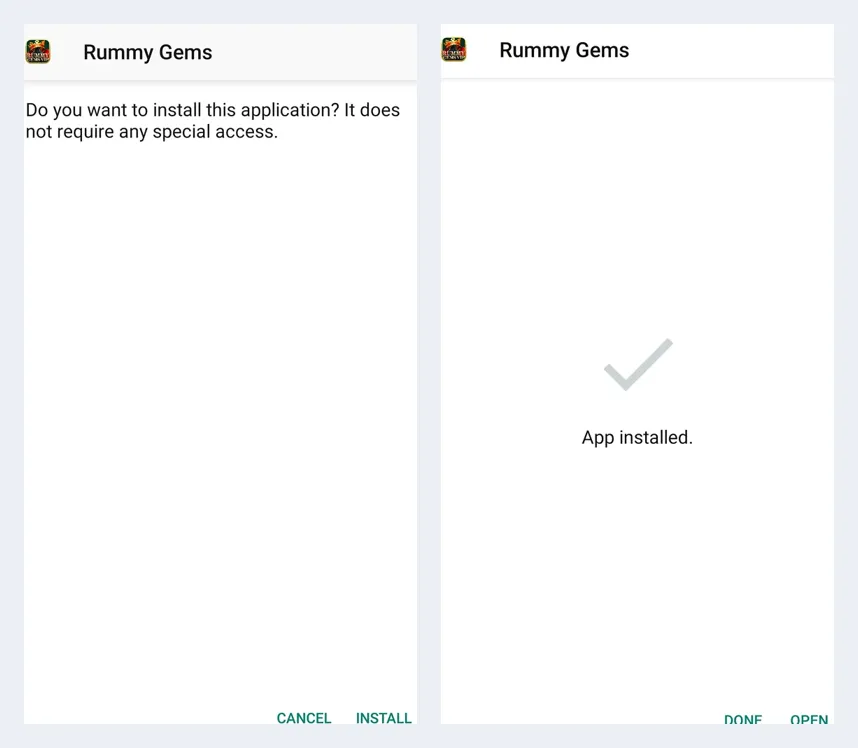
Android displays a standard warning for any APK downloaded outside an app store.
How to Install the APK (Enable Unknown Sources)
By default, Android blocks installations from outside app stores. You grant permission once for your browser or file manager, then install the file.
- Tap the downloaded file in your notification bar or Downloads folder
- If prompted, open Settings and enable Install unknown apps for that browser
- On older Android versions, go to Security settings and enable Unknown sources
- Return and tap Install
- Wait for the Installed message, then tap Open
- Play as a guest or verify your mobile number with an OTP to receive the ₹51 bonus
Once installed, you can disable the permission for unknown apps. The app continues to function, and you only need to re-enable it when a new version must be installed.
How to Update Rummy Gems
Updates include fixes, additional tables, and new promotions. On launch, the app checks for a newer version and displays a prompt if an update is available.
- Tap Update when the prompt shows, then allow the new file to download
- Install it over the old version so your account and balance stay unchanged
- If you see no prompt, download the latest APK file again from this site
- Do not uninstall first, as a fresh install could log you out of your account
Your balance is linked to your bound mobile number, not to the app file.
Troubleshooting Install Problems
Most installation errors relate to storage, permissions, or an incomplete download. The table below lists common messages and their solutions.
If an error persists, contact support via the in-app help section. Include your phone model and Android version.
| App not installed | Free up storage and try again |
| Parse error | Check that the phone runs Android 5.0 or higher, then download the file again |
| Install blocked | Turn on Install unknown apps for your browser |
| Download stops halfway | Switch to Wi-Fi and download the file again |
| Conflict with existing package | Install the update over the old app, do not mix files from different sites |
| App closes on launch | Restart the phone and clear the app cache |
FAQ
Yes. The APK file is free to download and install. Deposits are optional and only required for real-money tables.
The file size is 40 to 58 MB, depending on the build. Keep at least 100 MB of free storage for installation and future updates.
The app requires Android 5.0 (Lollipop) or newer. 2 GB of RAM is sufficient, but 4 GB runs it more smoothly.
No. The APK format is only for Android phones and tablets. Rummy Gems does not offer an iOS file.
No. Your balance is tied to your bound mobile number. Install the new APK over the old one and log in with the same number.
Open the app, go to your profile, and bind your mobile number using the OTP. The ₹51 sign-up bonus is added after verification.
Play responsibly. Real-money rummy is for adults 18 and over. If gaming stops being fun, contact a support service such as the Tele-MANAS helpline at 14416.